


We’re proud to announce Publish Targets and Domain Redirection -- two clever features that combine the power of dynamic DNS control, custom domains, and Webflow's ease-of-use.
We’re proud to announce Publish Targets and Domain Redirection -- two clever features that combine the power of dynamic DNS control, custom domains, and Webflow's ease-of-use.
Publish Targets
With Publish Targets, you can control where your site is published on the web. You get to choose which domains or subdomains your sites are published to.
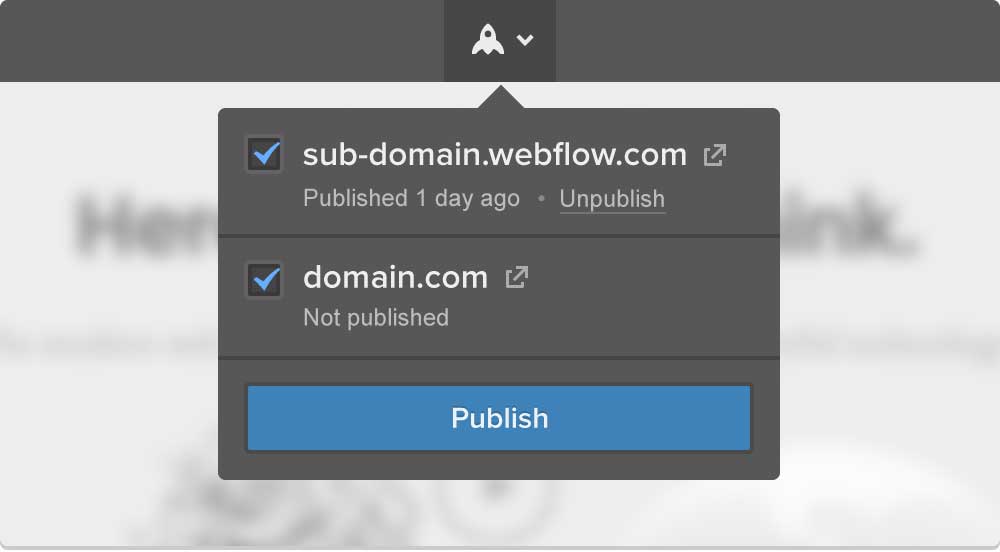
Example of subdomain and custom domain publish target options.
How it works
Beginning today, when you go to publish a website with an assigned custom domain, you’re presented with options for selecting where to publish your site. By default, your Webflow subdomain (e.g. yoursite.webflow.com) will be selected. Any attached custom domains will also appear here. You can selectively check/uncheck these (sub)domains prior to pressing Publish.
After publishing your site, you’re able to selectively unpublish domains or subdomains one at a time. That means you can unpublish your websites as easily as you published to them.
New workflows
The Publish Targets feature opens up several new workflow possibilities for Webflow users:
You can publish and test your work-in-progress changes to a private subdomain without modifying your primary domain. In other words you can use your Webflow subdomain as a staging environment. Not only does this allow you to take care of bugs in an isolated environment, it also allows you to start developing entirely new sections of your site that can be privately shared with others.
If you run an agency or design websites professionally, you can use Publish Targets to test work-in-progress client changes on your own, branded domain. For example, you can add a domain super-big-client.agency.com and publish selectively to it to provide your clients with a streamlined experience.
Domain Redirection
In addition to Publish Targets, we’ve released a new way for you to designate a “default” domain for your site. Setting a default domain will make all other custom domains 301 redirect to it.
How it works
Once a default domain is set, all traffic coming to other custom domains will be redirected to the default domain. For example, if have acme.com, www.acme.com, and acme.net as custom domains, and you set acme.com as the default domain, all domains will now redirect to acme.com. If you have other domains, they will also redirect to acme.com.
These are server-side 301 redirects which means that search engines will only consider your default domain as the one to crawl and rank. It’s best to choose your default domain the first time you setup your custom domains. Duplicate content, which is bad for SEO, is best solved through 301 redirects. Note - subdomains are not affected by default domains. To remove duplicate content on your subdomain, simply unpublish it.
As always, we encourage you to provide feedback on our new features. Got something to say? Make your voice heard on the Webflow Forum or email us at [email protected].
P.S. Expect many more powerful features in 2015. Follow us on Twitter for live updates.



















Get started for free
Create custom, scalable websites — without writing code. Start building in Webflow.